
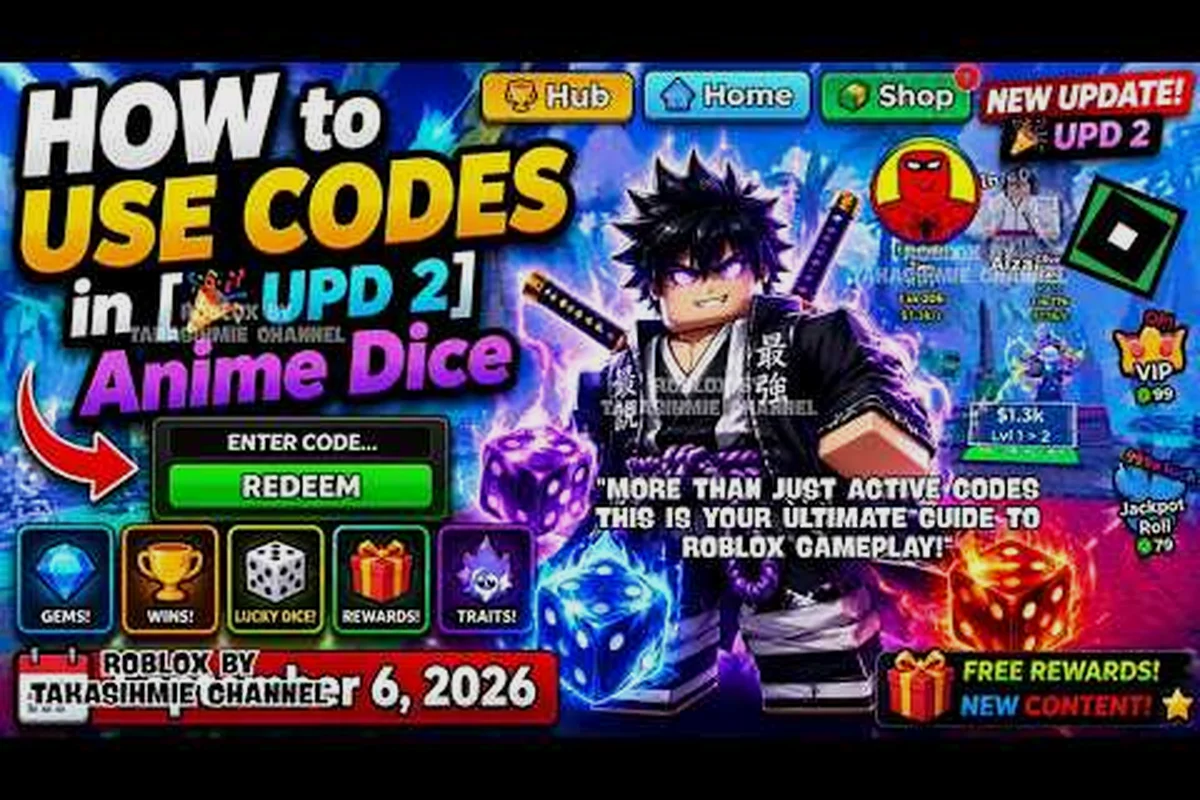
Where to Find the Anime Dice Code Box and Why It Matters
If you have ever typed a code into chat and wondered why nothing happened, the short answer is that Anime Dice has a dedicated code box hidden inside the in-game Shop. Knowing exactly where to find the box — and how to reach it without alt-tabbing back to a browser — is the difference between claiming a fresh batch of Lucky Spins and watching an expired code sit in your clipboard.
Anime Dice how to redeem codes starts with a single button. After the tutorial finishes, tap the Shop button on the main menu bar, scroll to the very bottom of the shop panel, and you will see a small text field labeled for code entry. Paste your code into that box, press the Redeem button next to it, and the reward (Lucky Spins, Trait Rerolls, or Gems) drops into your account instantly. If the box returns an error, the code is most likely expired, typo'd, or already used on the account — the game never partially redeems, so a failed attempt costs nothing.
The reason this matters right now is that the developer, More & More Games, is actively issuing new codes tied to the recent Update 3 milestone, and several earlier milestone codes have already expired. Players who redeem within the first 48 hours of a new code dropping almost always get the best reward bundles, because the developer front-loads the largest payouts into release windows. If you want the official list of currently working codes, the Anime Dice active codes for September 2026 page tracks every verified code in real time.
Before we get into the step-by-step table, here is a quick orientation table for the redemption process so you can see the full flow before diving into details — including the five core steps, where each one happens in the Anime Dice UI, and the most common mistake players hit at that stage (for example, pasting the code into the wrong field after the Update 3 patch shifted the Shop layout).
| Step | Action | Where It Happens | Common Mistake |
|---|---|---|---|
| 1 | Finish the tutorial | First 2 minutes of play | Trying to redeem before the Shop unlocks |
| 2 | Tap the Shop button | Main menu bottom bar | Looking under the Settings menu instead |
| 3 | Scroll to the bottom | Shop panel inside the game | Stopping at the Lucky Spin section |
| 4 | Paste code into the box | Bottom of the Shop panel | Typing the code manually with a typo |
| 5 | Hit Redeem | Same panel, next to the box | Closing the panel before the confirmation toast |
Exact Redemption Steps Inside the Anime Dice Shop
The full redemption flow takes about 15 seconds once you know where to look, but the first attempt can eat two or three minutes if you have never opened the Shop panel before. Here is the exact sequence, broken down with the same step labels the game itself uses on its in-game prompts.
Step 1 — Launch Anime Dice From Roblox
Open Roblox, search for Anime Dice, and click the green play button. The first two minutes of the experience are a guided tutorial that walks you through rolling your starter dice, equipping your first unit, and clearing the beginner stage. The Shop button stays locked until the tutorial ends, so any code typed into chat before that moment will silently fail. Wait for the confirmation toast that says "Tutorial Complete" before you move on.
Step 2 — Locate the Code Redemption Box
Once the tutorial clears, the main menu bar appears along the bottom of your screen. The Shop button is the second icon from the left, sitting between your Inventory and Settings tabs. Tap it once and the Shop panel slides in from the right side of the screen. According to the official Anime Dice Roblox page, this Shop is the only in-game surface where codes are valid — there is no separate redemption menu, no hidden settings screen, and no Discord slash command that triggers a code drop inside the game.
Step 3 — Scroll Past the Lucky Spin and Bundle Sections
The Shop panel has three visual sections stacked top to bottom: the Lucky Spins purchase area at the top, the Bundle Deals area in the middle, and the code redemption box at the very bottom. New players often stop scrolling after the Lucky Spins section because that is where the most colorful animations live. Keep scrolling until you see a small text field with placeholder text along the lines of "Enter code here."
Step 4 — Paste the Code Into the Redemption Box
Click into the text field and paste your code. Typing manually is risky because the codes include a mix of uppercase letters and numbers, and a single lowercase slip turns the code into a dead string. The safest approach is to copy the code from a verified source, click the field, and press Ctrl+V (or long-press and tap Paste on mobile). Each code in the Anime Dice codes 2026 list is published in its exact case-sensitive form, so case matters every time.
Step 5 — Hit Redeem and Watch for the Confirmation Toast
With the code pasted, tap the Redeem button immediately to the right of the text field. A small toast notification pops up at the top of the screen confirming the reward type and quantity — something like "+25 Lucky Spins" or "+500 Gems." If you see the toast, the code worked. If the toast reads "Invalid code" or "Code already redeemed," the code is no longer valid for your account. Rewards are added instantly; you do not need to restart the game or re-open the Shop.
| Reward Type | Typical Code Source | What It Does |
|---|---|---|
| Lucky Spins | Update codes, milestone codes | Adds rolls to the gacha wheel |
| Trait Rerolls | Milestone codes, Discord drops | Lets you re-roll unit traits |
| Gems | Update codes, event codes | Premium currency for Shop bundles |
Anime Dice Code Redemption: Common Errors and How to Fix Them
Even with the right steps, a redemption can fail for reasons that have nothing to do with the steps themselves. Here is a quick troubleshooting matrix that covers the four error states the game throws today, based on community testing as of September 2026.
| Error Message | Most Likely Cause | Fix |
|---|---|---|
| Invalid code | Typo, wrong case, or expired code | Re-copy from a verified source and retry |
| Code already redeemed | The same Roblox account used it before | Codes are one-per-account, no exception |
| Shop not unlocked | Tutorial still in progress | Finish the tutorial first, then retry |
| Nothing happens after Redeem | Network hiccup or server lag | Wait 10 seconds, close Shop, reopen, retry |
The "Code already redeemed" error is the one that catches veterans most often, because the developer does not reset codes between major updates — once you have used 5KCCU, it stays used on your account even after Update 4 drops. If you want to know which milestone codes are still claimable on a fresh account, the Anime Dice redeem walkthrough tracks expiration dates next to each code string.
For deeper coverage of which codes are confirmed active this month and which have already burned out, the Anime Dice codes list 2026 page is updated within hours of any new developer drop. That list currently separates the 8 still-active Update 4 strings from the 14 expired milestone codes tied to the original 2024 launch, and it logs each redemption's reported uptime so you can cross-check the troubleshooting matrix above against the specific error you just saw — for example, a "Code already redeemed" hit on HAPPY1K almost always means your account used it during the 2025 anniversary push, not today.
Anime Dice Where to Find Codes: Every Verified Source Ranked
Knowing how to redeem is only half the equation — the other half is knowing where the codes drop in the first place. The developer uses a handful of predictable channels, and the freshness of each source varies sharply. Below is a ranked list of every confirmed source, scored by how quickly a new code surfaces there after a drop.
| Rank | Source | Average Lag After Drop | Code Type |
|---|---|---|---|
| 1 | Official Anime Dice Discord (#codes channel) | Under 5 minutes | All code types |
| 2 | More & More Games Roblox group wall | 5–15 minutes | Milestone + update codes |
| 3 | Developer X / Twitter account | 10–30 minutes | Update + event codes |
| 4 | Anime Dice YouTube description | 1–6 hours | Milestone codes |
| 5 | Community wikis and fan sites | 6–24 hours | Aggregated, often expired |
The fastest source by a wide margin is the official Discord server. The developer posts every new code into a dedicated codes channel the moment it goes live, and the community almost always screenshots and shares the string before the announcement finishes loading. According to the Anime Dice Discord server description, the codes channel is pinned to the top of the server sidebar, so joining and scrolling up gives you a full historical feed of every code the developer has ever issued.
The second-fastest source is the More & More Games Roblox group wall, which is the same developer group that owns the game itself. When a milestone hits — for example, a like goal or a Discord member count threshold — the developer posts the matching code to the group wall before anywhere else. The current group has over 231,000 members as of September 2026, so milestone codes are usually tied to round-number member goals.
YouTube descriptions and community wikis are the slowest sources, but they are useful for archival purposes. If you are trying to figure out whether an older code like RELEASE or UPDATE1 is still claimable, the community wiki history shows when each code first appeared and when it was reported as expired.
How to Read Update Codes vs Milestone Codes
The two most common code categories you will run into in anime dice code redemption are update codes (like UPDATE2 or UPDATE3, which drop alongside major patch rollouts) and milestone codes (like 1KCCU or 5KCCU, tied to like, member, or visit counts on the official Roblox page). The key behavioral difference is that update codes arrive only after the developer ships a new content patch, so they are scarce but typically bundle 50+ spins, while milestone codes fire predictably whenever the game crosses a round social-media threshold, making them easier to time but smaller in payout.
| Code Type | Trigger | Example | Typical Reward Size |
|---|---|---|---|
| Update codes | Major game update goes live | UPDATE3, UPDATE2 | Larger bundles (50+ spins) |
| Milestone codes | Likes, members, or visits hit a round number | 1KCCU, 5KCCU | Medium bundles (10–25 spins) |
| Event codes | Limited-time in-game event | HALLOWEEN (hypothetical) | Variable, often exclusive |
| Discord codes | Community challenge completes | DISCORD500 (hypothetical) | Small but frequent |
Update codes tend to be the most generous because the developer uses them to celebrate content drops, while milestone codes reward players who helped the game reach a social milestone. Both code types land in the same redemption box at the bottom of the Shop, so the redemption process is identical regardless of which category you are working with.
Anime Dice Discord Codes and How to Track New Drops
The official Discord is the single highest-signal source for new codes, but only if you set it up correctly. Joining the server and lurking in the general chat means you will miss drops that happen in channels you are not watching. The fastest setup is to mute every channel except the codes channel and turn on notifications for that one channel specifically.
Setting Up Discord Notifications for New Codes
Open the Anime Dice Discord server, find the codes channel in the sidebar, right-click the channel name, and choose Notification Settings. Switch the setting from "Only @mentions" to "All Messages." That single change means your phone buzzes every time the developer posts a new code, which usually beats every other source by several minutes. The community-maintained unit value list and the developer announcement feed both sit in adjacent channels, so it is worth leaving those unmuted as well.
Why Discord Codes Sometimes Arrive Before the Roblox Group
The developer team monitors the Discord more actively than the Roblox group wall because Discord supports rich embeds, threaded discussions, and instant community feedback. When a milestone is approaching, the team will sometimes tease the code inside the Discord first, then post it to the Roblox group once the threshold is officially crossed. Players who rely on the Roblox group wall alone tend to miss these teasers, while Discord-active players claim the code the moment it goes live.
For a deeper breakdown of which Discord channels carry the freshest codes, the Anime Dice code shop and box reference page includes screenshots of the in-game Shop panel and the Discord channel layout side by side.
Anime Dice Milestone Codes and Update Codes: What to Claim First
Because every account can only redeem each code once, the order in which you claim codes matters when you are juggling several at once. The general rule of thumb reported by players is to always claim the latest update code first, then work backward through milestone codes from newest to oldest.
| Priority | Code Category | Why First |
|---|---|---|
| 1 | Latest update code (e.g., UPDATE3) | Largest bundle, shortest window |
| 2 | Newest milestone code (e.g., 5KCCU) | Confirmed working, recent drop |
| 3 | Older update codes (UPDATE2, UPDATE1) | Often still active for new accounts |
| 4 | Oldest milestone codes (1KCCU, RELEASE) | Most likely to be expired |
This priority list assumes you have a fresh account. If you have been playing for weeks, the older codes are almost certainly already used, so skip straight to the latest update code and any new milestone drops. For players who are already deep into the gem economy, the Anime Dice gem upgrade priority guide explains how to spend the Gems you just redeemed for the fastest progression.
Anime Dice Update Codes: Timing the Next Drop
Update codes are tied to the developer's patch schedule, which has been roughly one major update every four to six weeks since launch. The most reliable way to predict the next drop is to watch the developer's last patch notes — when the changelog mentions "new units," "new stage," or "balance pass," an update code almost always follows within 48 hours.
| Update | Approximate Drop Window | Code | Status (Sep 2026) |
|---|---|---|---|
| Release | Launch day | RELEASE | Likely expired |
| Update 1 | ~4 weeks after launch | UPDATE1 | Likely expired |
| Update 2 | ~8 weeks after launch | UPDATE2 | Possibly active |
| Update 3 | ~12 weeks after launch | UPDATE3 | Confirmed active |
The reward size tends to scale with how big the update is. UPDATE3 dropped alongside a major unit rebalance and a new endgame stage, so its bundle is noticeably larger than the earlier update codes. Treat specific reward quantities as approximate because media sources report slightly different totals — PCGamesN's September 2026 roundup, for example, lists the same codes with different spin counts than Beebom's coverage, but every source agrees on the reward categories (Lucky Spins, Trait Rerolls, Gems).
Frequently Asked Questions
Where exactly is the code box in Anime Dice?
The code box is at the very bottom of the in-game Shop panel. Open the Shop from the main menu bar, scroll past the Lucky Spins and Bundle sections, and the text field with placeholder text "Enter code here" appears last. Paste your code and hit Redeem.
Can I redeem a code more than once on the same account?
No. Every Anime Dice code is one-per-account, and the game never partially redeems. If you try to redeem a code you have already used, you will get a "Code already redeemed" error toast and the reward will not be added a second time.
What rewards do Anime Dice codes give?
Active codes reward three things: Lucky Spins, Trait Rerolls, and Gems. The exact bundle size depends on the code — update codes tend to give the largest payouts, while milestone codes give smaller but more frequent bundles. Treat specific quantities as approximate because media sources report slightly different totals.
Why does my code say "Invalid code" even though I copied it from a list?
The most common cause is a single-character typo, a wrong case, or an expired code. Re-copy the code directly from a verified source, paste it into the box without retyping, and try again. If it still fails, the code is almost certainly no longer active for any account.
Where do new Anime Dice codes drop first?
The official Anime Dice Discord server is the fastest source, with new codes usually appearing in the codes channel within five minutes of a drop. The More & More Games Roblox group wall is the second-fastest, followed by the developer's social accounts and YouTube descriptions.